

ExamAI – Smart Study Assistant Live
Free JEE, NEET, UPSC, SSC, Banking, CAT & CDS/NDA exam prep — quizzes, notes, and mock tests. No login, no subscriptions, no hidden charges.
Full Details
Screenshots
About
ExamAI is a completely free Android app for students preparing for JEE, NEET, UPSC, SSC, Banking, CAT and CDS/NDA exams. No subscriptions, no login, no API keys — just open and start studying.
Features
Multiple Exams Covered
JEE, NEET, and UPSC preparation in one app, with more exams planned.
200+ MCQ Questions
Curated real exam-level questions across subjects.
Live Questions
Fetches fresh questions from Open Trivia DB.
Study Notes
Topic summaries powered by Wikipedia.
Offline Mode
Works without internet after first use.
No Login Required
Just install and start — completely free, no hidden charges.
Subjects Covered
- JEE (Engineering) — Physics, Chemistry, Mathematics
- NEET (Medical) — Biology, Physics, Chemistry
- UPSC (Civil Services) — History, Polity, Geography, Economy (coming soon)
What's New
Ad verification fixed
Published app-ads.txt on brynflow.com so ExamAI's AdMob ad setup verifies correctly on Google Play.
Privacy policy updated
Clarified exactly what's stored locally versus sent to third-party APIs (Open Trivia DB, Wikipedia, NCERT).
Frequently Asked Questions
Do I need to create an account to use ExamAI?
No. There's no login, no email, and no phone verification — you can use the full app anonymously from the moment you install it.
Is my quiz history or study data uploaded anywhere?
No. Quiz history, scores, bookmarks, notes, and preferences are stored only on your device and are never uploaded to any server we operate.
Does ExamAI cost anything?
No. It's completely free, with no subscriptions, in-app purchases, or hidden charges.
Does ExamAI work without an internet connection?
Yes, in offline mode after your first use — content is cached locally so you can keep practicing without a connection.
What data does ExamAI actually collect?
Only an anonymous advertising ID (used by Google AdMob) and an anonymous Firebase installation ID (used for crash reporting and analytics) — neither is tied to your name or identity. Full details in the privacy policy.

FileForge Live
An offline-first resume & CV builder for Android — create, edit, and export professional resumes with AI-assisted writing help.
Full Details
Screenshots
About
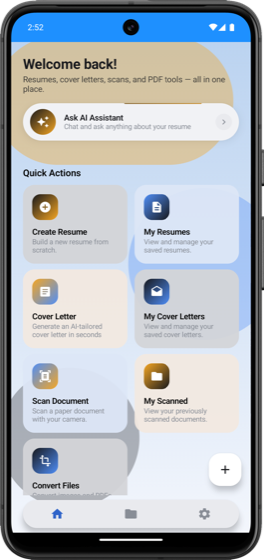
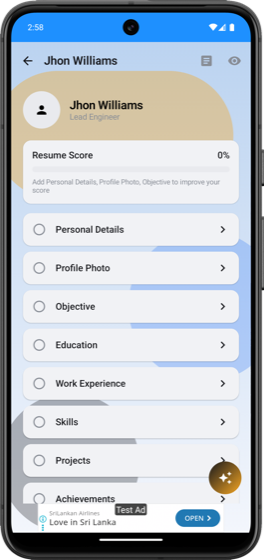
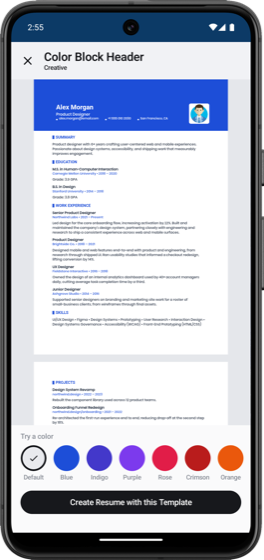
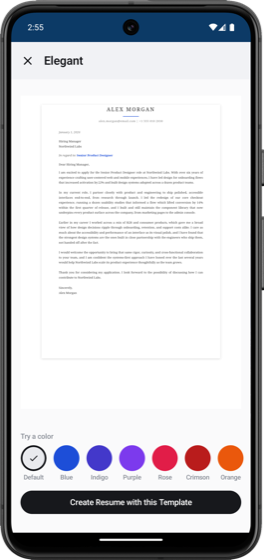
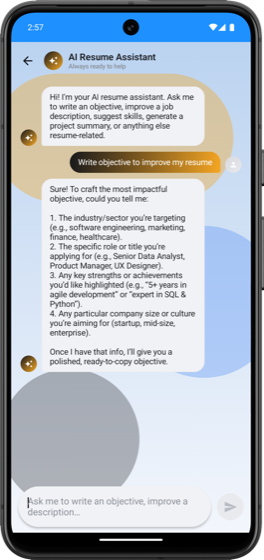
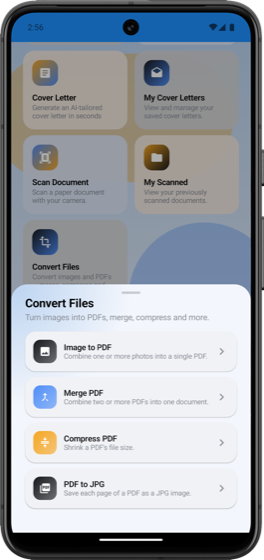
FileForge is a free Android app for building resumes from customizable templates, scanning and importing existing documents, and improving wording with AI assistance — all with resume data stored locally on-device rather than on a remote server.
Features
Templates
Multiple professionally designed resume layouts and themes.
Document Scanner
Scan and import existing paper resumes or documents.
AI Writing Help
Improve summaries, job descriptions, and skills with AI suggestions.
PDF & Word Export
Export finished resumes locally as PDF or Word files.
Multi-language
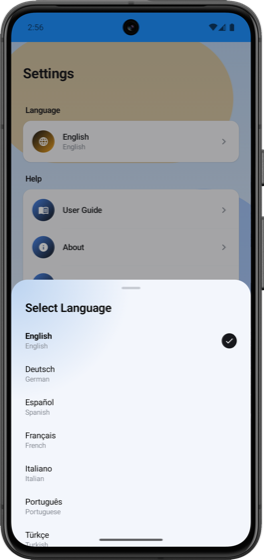
Supports 11 languages for the app interface.
Offline-first
Resume content is stored locally; no account or sign-in required.
What's New
Now live on Google Play
FileForge is out of development and available to download now.
Accounts and payments removed
FileForge no longer has any sign-in flow or in-app purchase options — it's a fully free, local-first tool with nothing to log into or buy.
Frequently Asked Questions
Do I need an account to use FileForge?
No — there's no sign-in or login of any kind, ever.
Where is my resume data stored?
In a local database on your device only. We don't operate servers that hold your resume content, and nothing is uploaded automatically.
Does FileForge cost anything?
No — it's free, with no in-app purchases or subscriptions.
Is my resume content sent anywhere when I use the AI writing assistant?
Only the specific text you submit to the AI feature is sent to Groq, Inc. to generate a suggestion. No other resume data leaves your device. See the privacy policy for details.
What happens to my resumes if I uninstall the app?
They're permanently deleted — since your data only ever lived on your device, there's nothing left on our end to remove.

Code Compiler Coming Soon
A pocket code editor and compiler for Android — write and run 12 programming languages with syntax highlighting, real-time suggestions, and 240 built-in sample programs to learn from. Includes a built-in API Client and developer tools, and the app UI is available in 24 languages. No login required.
Full Details
About
Code Compiler is a free, ad-supported Android app for writing and running code directly on your phone. It supports Java, Python, JavaScript, TypeScript, C, C++, C#, Go, Rust, Swift, Ruby, and PHP, with a full editor (syntax highlighting, line numbers, undo/redo, word wrap, adjustable font size) and real code execution — no desktop required. It also includes an API Client for testing HTTP requests and a Developer Toolkit (Regex, JSON, Base64/Hash), and the app itself is localized into 24 languages.
Features
12 Languages
Write and run Java, Python, JavaScript, TypeScript, C, C++, C#, Go, Rust, Swift, Ruby, and PHP.
240 Learning Samples
20 curated Easy/Medium/Hard sample programs per language to learn from and run instantly.
Real Code Editor
Syntax highlighting, line numbers, undo/redo, word wrap, and adjustable font size.
Live Suggestions
An autocomplete bar suggests keywords and common calls as you type.
Snippets
Built-in code snippets per language, plus save your own custom ones.
Run History
See execution time, memory used, and past runs for every file.
File History
Every file is saved automatically — search, pin, or delete anytime.
API Client & Dev Tools
Send test HTTP requests, plus a built-in Regex tester, JSON formatter, and Base64/Hash encoder.
24 Languages Supported
The app interface is localized into 24 languages, in addition to the 12 programming languages you can run.
No Login Required
Just install and start coding — completely free, no account needed.
Frequently Asked Questions
Do I need to create an account to use Code Compiler?
No. There's no login of any kind — install and start writing code immediately.
Is my code uploaded anywhere?
Your files are stored only in a local database on your device. When you tap Run, your code and any input you provide is sent to a code execution service solely to compile and run it and return the output — it isn't stored by us afterward.
Does Code Compiler cost anything?
No — it's completely free, with no subscriptions or in-app purchases.
Which languages are supported?
Java, Python, JavaScript, TypeScript, C, C++, C#, Go, Rust, Swift, Ruby, and PHP — each with 20 built-in sample programs to learn from. The app's interface is separately available in 24 languages.
Does Code Compiler show ads?
Yes. Code Compiler is free to use and supported by ads served through Google AdMob. Full details in the privacy policy.

Party Rush Coming Soon
A frantic party battle-royale for Android — dodge a spinning sweeper bar on a shrinking island, dash and jump past 7 rivals, grab power-ups, and survive to be the last one standing. Play instantly as a Guest, customize your character, and battle friends online or over the same Wi-Fi. Free to play, with optional ads and no in-app purchases.
Full Details
About
Party Rush drops 8 players onto a shrinking arena guarded by a rotating sweeper bar — dash, jump, and outlast everyone else to win. Choose from 8 themed arenas, customize your character's outfit and colors, and climb the ranks through daily quests and achievements. Jump into a quick match with bots, host or join an online room with friends, or play fully offline over the same Wi-Fi network with no internet required. Sign in with Google to sync your progress across devices, or play entirely as a Guest — your choice.
Features
8 Themed Arenas
Battle across 8 unique shrinking-island arenas, each with its own hazards and visual style.
Dash & Jump Combat
Dodge the spinning sweeper bar with precise dash and jump mechanics.
Power-Ups
Grab shields, speed boosts, and other pickups to turn the tide of a match.
Full Character Customization
Mix and match skins, colors, and outfits to make your character your own.
Online Multiplayer
Host or join online rooms with up to 8 players in real time.
Same-Wi-Fi Multiplayer
Play with friends on one Wi-Fi network with zero internet or server involvement.
Daily Rewards & Quests
Log in daily for coin rewards and complete fresh quests every day.
Achievements
Unlock badges and bonus coins as you rack up wins and knockouts.
Guest Mode
Jump straight into a match with no account — sign in with Google only if you want cloud sync.
No In-App Purchases
Completely free to play with no in-app purchases — every coin and unlock is earned by playing, or by watching an optional rewarded ad.
Frequently Asked Questions
Do I need to create an account to play Party Rush?
No. You can play the entire game as a Guest with your progress saved locally on your device. Signing in with Google is optional and only needed for cloud sync and online multiplayer with friends.
Does Party Rush show ads or have in-app purchases?
Party Rush is free to play and supported by ads served through Google AdMob (a small banner on menu screens, and an optional rewarded video for bonus coins). There are no in-app purchases — every coin and unlock is earned for free through play, daily rewards, and quests.
What is Same-Wi-Fi multiplayer?
It lets you play with friends who are on the same Wi-Fi network as you, entirely offline — no internet connection or server is used, so it's completely free and works without a data connection.
How many players can be in one match?
Up to 8 players per match, whether you're playing with bots, online, or over the same Wi-Fi.