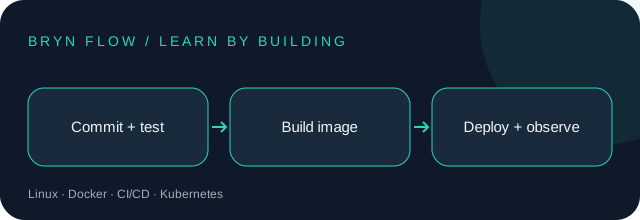
Before you start: Basic terminal commands, Git, and a simple HTTP app.
Your toolkit: Linux · Docker · CI/CD · Kubernetes
Trending selection reviewed : CNCF’s annual survey documents broad production adoption of Kubernetes among container users. Read the report. This is an editorial selection, not a live popularity ranking.
Your learning path
1Separate build and runtime
A build produces an artifact. Runtime starts that artifact with configuration for its environment. Rebuilding different code on each server makes failures harder to reproduce. Tag artifacts with a commit ID and record what version is deployed.
Try it: Write down the exact build command, startup command, and required environment variable names for one app.
2Understand containers
An image is a packaged filesystem and startup configuration. A container is a running instance of that image and shares the host kernel. Keep persistent data in a database or volume; replacing a container should not erase business data.
Try it: Run a local container, inspect its logs, and explain what disappears when it is removed.
3Publish a local port
Port publishing maps a host port to a container port. Binding the host side to 127.0.0.1 limits a learning server to your own machine. A port mismatch is a common cause of an apparently broken service.
Try it: Run the example below and open http://localhost:8080. Stop the container when done.
4Automate checks before release
A CI pipeline checks out a commit, installs dependencies from a lockfile, runs tests, and builds an artifact. Keep test jobs separate from deployment permissions. Deploy only after required checks pass and the release has the intended approval.
Try it: Describe a pipeline that fails when a test fails. Explain why a PR job should not receive production write credentials.
5Observe and recover
Logs describe events; metrics show trends such as request errors and latency. Health checks should test useful readiness, not merely that a process exists. Define how to roll back to a previous image when the new release fails.
Try it: Write a rollback exercise: deploy version A, simulate a failed B health check, then restore A.
6Know when orchestration helps
Kubernetes schedules containers and manages desired state, networking, and rollout behavior. It introduces operational complexity. Learn Deployments, Services, and readiness probes in a local cluster after one container works; a small static site may not need a cluster at all.
Try it: Draw how a Service routes to Pods and describe what happens when one Pod fails readiness.
A worked example
Use this small example to connect the lessons to code. Read the comments before running it.
docker run --rm --name brynflow-demo \
  -p 127.0.0.1:8080:80 nginx:alpine
# Open http://localhost:8080
# In a second terminal:
docker logs brynflow-demo
docker stop brynflow-demo
# For reproducible deployments, pin the reviewed image digest.
PUT IT INTO PRACTICE
A containerized service with a release checklist
Build the project described in the lessons, then verify these acceptance criteria:
The demo binds only to localhost.
A failing check prevents a release.
A previous artifact can be restored.
Deliverable: your source code, a short README, and evidence for each check. Explain one tradeoff you made.